
The ABB Fieldbus Adapter Trap: Same Protocol, Same Port—Still Not Always Compatible
Why a communication adapter must be matched to the PLC protocol, ABB drive platform, firmware, option slot and project configuration—not selected by connector shape alone.
A stopped drive often produces a deceptively short RFQ: “ABB PROFINET card required” or “need an Ethernet adapter for a Siemens PLC.” Those descriptions identify a network family, but they do not identify a safe spare. ABB drives can communicate with Siemens, Allen-Bradley, Schneider Electric, Omron, Beckhoff and major DCS platforms, yet there is no universal adapter for every controller, protocol and ABB drive generation. A RETA-02 and an FPNO-21 can both appear in a PROFINET discussion, while belonging to different product generations and installation contexts. The same problem appears with RETA/FENA Ethernet modules, RPBA/FPBA PROFIBUS modules and RECA/FECA EtherCAT modules. For maintenance engineers and MRO buyers, the practical rule is simple: identify the complete communication chain before asking whether a module will fit.
The Hidden Compatibility Problem Behind ABB Fieldbus Adapters
An adapter sits between two engineered systems. On one side is a PLC or DCS with its network master, device-description file and data map. On the other is an ABB drive with a specific control unit, option interface, firmware release and parameter structure. The RJ45, D-sub or terminal connector is only the visible part of that relationship.
That is why an experienced industrial automation parts supplier should ask for more than “Ethernet card.” A useful quotation starts with the drive nameplate, the installed adapter label and the control-system configuration.
One Drive May Connect to Many PLC Brands—but Not With One Universal Adapter
The PLC brand does not directly determine the ABB adapter. The first engineering question is which protocol the controller or gateway actually exposes. The second is whether the installed ABB drive accepts the adapter family being considered.
| Control ecosystem | Protocols often encountered | What procurement must verify |
|---|---|---|
| Siemens | PROFINET, PROFIBUS DP | Controller interface, network role, GSD/GSDML file and ABB drive family. |
| Allen-Bradley | EtherNet/IP, DeviceNet, ControlNet | Scanner type, EDS file, requested data assembly and adapter generation. |
| Schneider Electric | Modbus TCP, Modbus RTU, CANopen; sometimes EtherNet/IP | The project’s active protocol—not the PLC badge—plus serial/Ethernet settings. |
| Omron | EtherCAT, EtherNet/IP | Network master, ESI/EDS file, cyclic data and synchronization requirements. |
| Beckhoff | EtherCAT | ESI revision, process-data objects and approved ABB option for the drive. |
| Honeywell, Emerson or Yokogawa DCS | PROFIBUS, PROFINET, Modbus TCP/RTU | DCS interface card, gateway use, redundancy design and project database. |
Why the Same Protocol Does Not Mean the Same ABB Adapter
RETA-02 vs FPNO-21
Both names can appear in PROFINET projects, but their manuals, platform context and feature sets are different. ABB documentation for RETA-02 describes PROFINET IO, while the FPNO-21 manual covers a later F-series adapter. Treat a proposed change as an engineered migration.
RETA-01 vs FENA family
RETA-01 supports Modbus TCP and EtherNet/IP. FENA-01/-11/-21 documentation covers several industrial Ethernet protocols. Shared protocol names do not establish slot, drive, firmware or configuration compatibility.
RPBA-01 vs FPBA-01
ABB’s FPBA-01 manual includes an RPBA emulation mode for defined migration cases. That feature is evidence that data mapping and PLC configuration matter; it is not permission to substitute modules without checking the drive and project.
RECA-01 vs FECA-01
Both are EtherCAT adapters from different ABB module families. Confirm the drive’s supported option list, control-unit firmware, ESI file and cyclic process-data configuration before ordering.
Older drive documentation commonly lists R-series adapters with platforms such as ACS800, ACS550 and ACH550. Newer drive manual sets for ACS580, ACH580, ACQ580 and ACS880 list F-series options. These are useful starting points, not a universal compatibility table. Final suitability must be confirmed against the exact drive hardware manual, option-slot instructions and current ABB documentation.
Six Compatibility Layers to Check Before a Retrofit
1 · Physical fit
Option-slot type, mounting, connector orientation and whether another option already occupies the slot.
2 · Drive support
Complete drive type code, control unit, firmware revision and approved adapter list.
3 · Network identity
Actual protocol, master/scanner type, topology, addressing and termination.
4 · Engineering file
GSD, GSDML, EDS or ESI version used by the PLC/DCS project.
5 · Data profile
ABB Drives profile, PROFIdrive or vendor-specific mode; control word, status word and process-data length.
6 · Commissioning state
Saved parameters, IP or node address, scaling, timeout behavior and functional test plan.
Replacement Decision Guide
Exact adapter model and order code are available
Compare the complete label, hardware revision, drive type, firmware and network configuration. Back up parameters before removal; “same model” still requires a controlled commissioning check.
The model matches, but the hardware revision differs
Request the revision label and manufacturer change information. Confirm firmware requirements, device-description files and whether the project restricts a particular hardware release.
A newer ABB adapter is proposed
Treat it as a migration. Verify drive support, option slot, protocol profile, PLC hardware configuration, GSD/GSDML/EDS/ESI file and parameter mapping. Plan time for download and functional testing.
No direct replacement is confirmed
Do not bridge the gap with a visually similar card. Review repair, an exact obsolete spare, an ABB-supported migration or a documented third-party gateway. Record the operational and cybersecurity implications of each route.
Interactive compatibility check
What information do you have right now?
Choose the situation closest to your project. The checklist below changes immediately and shows what to send for a useful compatibility review.
Start with an identity and revision match
An exact model is a strong starting point, but it is not the complete compatibility decision. Send the full label and installed context.
Do not select an adapter from the protocol name alone
The same protocol can appear in different ABB adapter generations. Identify both ends of the communication chain before comparing products.
Treat the proposed adapter as an engineered migration
A newer module may change device files, process-data mapping, firmware requirements and commissioning work even when the network name is unchanged.
Compare repair, exact spare and migration routes
For an urgent failure, include photographs and the operational deadline. A visually similar adapter should never be treated as a confirmed replacement.
ABB Communication Products Verified on Our Website
These product pages currently exist on salesplcauto.com. They are sourcing references, not claims of interchangeability.
Swipe or scroll →
ABB FENA-01 68469422
One-port Ethernet adapter listing for ABB drive connectivity. Verify the ACS355 drive type, required protocol, firmware and network configuration.
View product →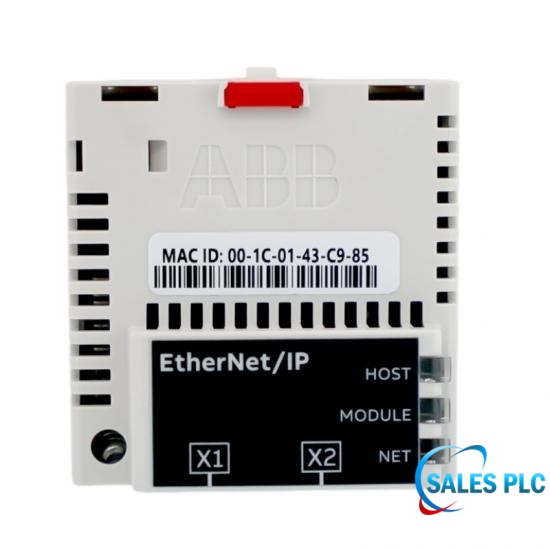
ABB FEIP-21 3AXD50000192793
EtherNet/IP adapter module listing. Confirm the installed drive or control-unit version, option interface, firmware and PLC data assembly.
View product →
ABB FCNA-01
ControlNet adapter module listing. Confirm the complete module identity, compatible ABB drive, network configuration and installed application.
View product →Five Details to Send Before Ordering
A fast quotation depends on a technically complete RFQ. For planned retrofits or urgent downtime, send these items together rather than one message at a time.
Complete type code and a clear nameplate photograph.
Front and side labels, order code and hardware revision.
Brand, controller/interface model and network-master details.
PROFINET, PROFIBUS DP, EtherNet/IP, EtherCAT, Modbus or another network.
Exact replacement, cross-brand integration, drive retrofit or platform migration.
Device file version, data map, firmware, fault code and parameter backup if available.
This information must be confirmed against the nameplate, manufacturer documentation or customer-supplied technical files. Price and lead time can also depend on exact order code, revision restrictions, required condition, quantity, destination and inspection documentation.
FAQ
Can I choose an ABB adapter from the PLC brand?
No. Identify the protocol and controller interface first, then match the adapter to the exact ABB drive. A PLC family may support several network options.
Can RETA-02 replace FPNO-21 because both support PROFINET?
Do not assume so. They belong to different ABB adapter generations and must be checked against the drive, option slot, firmware, GSDML file and project configuration.
Is an identical part number always plug-and-play?
Not necessarily. Check hardware revision, drive firmware, stored parameters, device files, network address, process-data mapping and operational test requirements.
Will a replacement require PLC or drive programming?
An exact spare may only require restoration of approved settings, while a successor module may require a new device file, hardware configuration, parameter mapping and commissioning. Confirm before shutdown.
What if the original ABB adapter is obsolete?
Compare four routes: source the exact obsolete ABB fieldbus module, repair the original, use a manufacturer-supported successor or engineer a gateway/migration. None should be declared equivalent without evidence.
How can an urgent retrofit quotation be accelerated?
Send the drive and adapter nameplates, PLC/DCS interface, protocol, fault context, quantity, destination and required date in the first RFQ. Photographs of the slot and connectors help prevent clarification delays.
Send your ABB adapter requirement
Frida supports international maintenance, retrofit and MRO sourcing. Include the complete drive, adapter and control-system context so the request can be reviewed efficiently.
Contact · Frida sales17@amikon.cn WhatsApp · +86 153 5940 8275ABB Fieldbus Adapter Enquiry
Submitting opens your email application with the completed request addressed to Frida. Review the message, attach nameplate photos if available, then send.
Engineering references: ABB RETA-02 manual ABB FPNO-21 manual ABB FENA manual ABB FPBA-01 manual



 Network Supported




 32D Guomao Building, No.388, Hubin South Road, Siming District
 +86 18150117685
 sales1@amikon.cn